Monday, 26 August 2013

Did you know that a lot of school students carry between eight to 10 kilos of books to and from school everyday? If you've got back pains, then you probably did! Well, if an experiment organised by Microsoft and the Philadelphia school district is successful, that and many other things about stundents' lives will change in the future, It doesn't even have an encyclopedia.
working on laptop virtual education

According to Microsoft, in the future all students will have writing tablets and students will only study the material which is available on the internet.
Smartboards, which function as white boards


Posted on 06:26 by Unknown

Saturday, 24 August 2013

BMW x5 edrive

While BMW has been dabbling in diesel sedans and readying i3 and i8 for their 2014 debut, the German automaker has not neglected those who would rather have a hybrid. Next month at the Frankfurt Auto Show, the BMW Concept X5 eDrive plug-in hybrid will be unveiled to the world, and though not confirmed for production, it certainly looks ready for primetime.
The BMW Concept X5 eDrive pairs a 95-horsepower electric motor with a turbocharged 4-cylinder engine (of unspecified displacement and power), and can reportedly operate under electric power for up to 19 miles, and at speeds of up to 75 mph. BMW claims it consumes just 3.8 liters of fuel per 100 km, which works to approximately 62 mpg on the U.S. testing cycle.
Being a Bimmer though, engineers made sure the X5 could scoot to 60 mph in under 7 seconds, and the Concept X5 eDrive also comes with three battery modes. Save Battery maintains the current battery levels, allowing drivers to make a highway trip before slipping into electric mode at their urban destination. There’s also an all-electric mode, as well as a mode that handles all that thinking for you.
The BMW Concept X5 eDrive makes its official debut next month, and it looks ready to go from the show floor to the dealership if you ask me


Posted on 09:29 by Unknown

Thursday, 22 August 2013


By utilizing custom dashboards, you can keep an eye on specific aspects of your blogs health. Doing this will give you a greater overall picture of how your site is performing, as well as how it may need to be improved.

The real benefit of using multiple dashboards is that you can easily segment the data, making it easier to understand and digest. Using custom dashboards, you’ll be able to see a spike or loss in traffic, whether or not your landing pages are performing well and if your social mentions have increased from a social campaign, and much more.

There are several dashboards available to use, but these five should give your site an immediate boost if you use the data they provide properly.

(Note: To use the links make sure you’re logged in to Google Analytics, or the links will appear broken!)

1. Brand Monitoring


The Brand Monitoring dashboard allows you to customize and replace the key terms with your own brand. By doing this, you can see how mentions of your brand are appearing in different social media channels.

You can also see where and how often you’ve been mentioned, as well as the percentage of visits to your site from each source. Having this information can help you gauge how effective your marketing campaigns and efforts are.

2. SEO Dashboard

SEO Dashboard allows you to see the total number of organic visits to your website as well as which keywords are bringing in traffic. It will also allow you to see which landing pages are most popular and effective.

You can also see which sites people are being directed from, as well as the bounce rate of new keywords. SEO Dashboard is a pretty deep tool, so taking a bit of time to explore what it can do your site is a smart move.

3. Social Monitoring


The Social Monitoring dashboard is specifically used to tell you how social media is affecting your site. In order to be effective and streamlined, Social Monitoring limits the data it shows you to tell you which social media networks are bringing in the most data, how they’re interacting based on time and day and much more.

4. Traffic Dashboard


Traffic Dashboard was designed to help you keep an eye on your incoming visitors. Using the dashboard, you can find out how many unique pageviews you’re getting, how many pages users are visiting, the total number of pageviews, how much time they’re spending on your site and on each page in particular. You can also perform a comparison search by date range to figure out where decreases in traffic are coming from so you get a jumpstart on correcting them.

5. Ecommerce Dashboard


If you have e-commerce tracking enabled on your site, you can use the Ecommerce Dashboard to find your conversion rate, total revenue, average value of individual sales and the average value of transactions and unique purchases.

Correlating this with other dashboard tools, you’ll be able to see where these sales are coming from and how you can better focus your efforts to make more or boost lagging sales figures.

Using these five dashboards, you can keep an eye on the health of your site and perform strategic calls to action to improve your site. For example, if you want to focus on running a Facebook giveaway, using these tools could tell you whether or not the campaign was successful by telling you about unique page visits, where users were coming from and a whole lot more.

If you install these dashboards, and you should, make sure you examine how well they are performing at least once per week in order to really get the most information you can from them. If you monitor these dashboards regularly, they can only help your business grow.

Posted on 02:00 by Unknown

yahoo beats google in us internet traffic

IT WAS the darling of the 1990s dotcom boom, but by the late 2000s Yahoo! was washed up, perpetually second to Google.
But has new CEO Marissa Mayer achieved the seemingly impossible?
For the first time in five years, Yahoo! has topped Google for US internet traffic.
Google has held the number one position continually since April, 2008.
To put that into perspective, Yahoo! had never been on top while Barack Obama has been US President, or while iPhones have been available in Australia.
The stats, from comScore, don't explain why Yahoo! has managed to knock Google off the top spot.
It could be related to Yahoo!'s acquisition of blogging site Tumblr, which has separate traffic, but could be directing traffic to Yahoo!
ComScore told Marketing Land that Yahoo! and Google had been close in traffic recently.
"There are other factors at play... it can likely just be normal seasonal/month-to-month fluctuations," the statement said.
Ms Mayer has been a controversial CEO since she started at the company in 2012.
In February she banned the previously-generous work from home allowances, and was criticised again a month later for vetting new recruits too closely.
Since taking the helm, Ms Mayer has overseen the acquisition of a growing list of start-ups, including Tumblr, Snip.it, GhostBird, Xobni and Qwiki.

Posted on 01:44 by Unknown

Saturday, 17 August 2013

google servers go down

A few days ago on Saturday morning all Google services like Gmail, Youtube, Google search etc. were out. The internet suffered a lot because Google IS internet.
The Google App Dashboard documented this brief outage as all apps provided by the search giant went down for around 5 minutes.
The app dashboard for Gmail had the following message for users:
"We’re aware of a problem with Gmail affecting a significant subset of users. The affected users are able to access Gmail, but are seeing error messages and/or other unexpected behavior."
CNET reported that according to web analytics firm GoSquared, traffic on the internet dropped around 40 percent during those five minutes and perhaps only highlights the reliance of internet users on the search giant.
After Google returned to normal, internet traffic did as well and asCNET points out search engines like Yahoo! and Bing weren’t able to capitalise on Google’s outage, only highlighting our dependence on services Google provides.
Google hasn’t made any statement yet on what cause the outage. 

Posted on 23:09 by Unknown

Friday, 16 August 2013

What you get for freewordpress or blogger comparison
WordPress.com is a commercial venture. It’s a way for the kind souls who have put time, money and a whole load of effort into the open source and free-to-download WordPress blogging engine to make some money back. They do this by making it stupidly simple to set up and maintain a blog, while introducing some rather hefty limitations for experienced users.
free WordPress.com account offers:
  • A blog, which you can turn into a full-on static or hybrid (part blog, part static) website.
  • 3GB of free storage for posts and media.
  • Publicize, a tool for connecting your blog with social networks.
  • Free statistics for tracking visitors.
  • Access to hundreds of non-premium themes, many of which can be customised further.
  • WordPress.com access from mobile apps for iPhone, iPad, Android and BlackBerry.
WordPress.com designates the following as premium upgrades:
  • Custom Design ($30 per blog, per year) adds custom CSS (not PHP editing) and fonts.
  • Custom Domains ($13 per domain, per blog, per year) removes the .wordpress.com part of your URL.
  • Guided Transfer ($129 one-off payment) for transferring your WordPress.com site to your own web-host for greater independence and freedom.
  • Ad-free ($30 per blog, per year) removes any possibility of WordPress.com showing adverts on your blog to non-logged in visitors.
  • Premium themes (priced per blog for the lifetime of the blog).
  • A redirect ($13 per blog, per year) for redirecting traffic from yourblog.wordpress.com to your new domain.
  • Additional space (priced per amount) for storing more posts and media.
  • VideoPress ($60 per blog, per year) for uploading, hosting and embedding your own videos on your WordPress.com blog

Conversely, Blogger is not a commercial service. It was acquired by Google in 2003 who have since kept it ticking over, with a few redesigns and some recently-added new templates. The rather ancient Blogger features page (ancient because it explicitly mentions uploading to Google Video and easily accessing iGoogle, two of Google’s many dead projects) promises users access to all features. There are no upgrades, no fees for adding a custom domain, and all the customization options thrown in that Blogger has available.

Included features worth noting are:
  • A template designer for customizing your blog’s appearance.
  • Free hosting, free Blogger (or Blogspot) sub-domain and option of using a custom domain (either registering through Blogger or using one you already have).
  • The ability to add media to your posts, with no quoted maximum storage space.
  • Quick access to Google’s advertising schemes.
  • Pages static content on your blog.
  • Mobile access via iPhone and Android apps, as well as SMS or email blogging.
It would seem that despite WordPress having the plugins and themes markets sewn up, Blogger still offers more for those looking for a free service.

The Sign-Up Process

WordPress.com allows you to register for an account with an email address, username, password and URL. Blogger is a Google service, and just like YouTube, requires a Google account. If you already have a Google account then this makes signing up a painless affair, but if you don’t (highly unlikely, unless you have something against Google), you’ll have to register for the whole package. This also means if you do have a personal Google Account but want to distance yourself from the topic you’re blogging about you’re going to have to create a new account, and also deal with Google’s messy multiple-account management.
wordpress sign up

Google’s sign-up process doesn’t indicate that you do not need to supply a mobile phone number or an email address, despite asking for one. Conversely WordPress.com only asks to fill out four fields but will also run a check for the URL you enter and try to sell you a premium domain (which costs to register, and requires an account upgrade to use on WordPress.com) as well as pointing out the flaws in the free account you’re about to register.

Managing Your Blog

Both WordPress and Blogger have centralized areas from which to manage your blog empire, which are separate to the settings for the blogs themselves. The two areas are equally attractive and usable, with both services featuring an area to read blogs you follow as well as the various outlets under your control.
wordpress blog management

On WordPress this takes the form of a deep attractive blue theme with a tabulated layout that allows you to quickly switch between reading, overseeing blogs and managing analytics in addition to a quick post button.

wordpress or blogger
Blogger houses all of this on the one page, with a quick compose button found next to the blog title itself. Beneath this are new posts from the blogs you have chosen to follow on the service. It goes without saying that you can’t follow Blogger blogs on WordPress.com and vice-versa, though it would be nice if we could all get along

In Conclusion,
I'd highly recommend you to use blogger to create your blog, it gives you alot of facilities and comfort and easiness for free. 

Posted on 23:18 by Unknown

Use your smartphone as telescope
Casual Telescope
Well, you won't Believe it, but you have to.. you know what. You can use your smartphone to take telescopic images!!! yeah yeah you can see the rings of Saturn, the clouds of distant nebulae. All you have to do is create a simple smartphone mount and you can see crisp images right from your backyard observatory. Russ McAllister from Cabot, Ark., designed this rig for his iPhone and posted the plans on Instructables.com (search for "iPhone mount for telescopes"). Google Nexus 4 can now also be used. Annnddd I'm gonna teach you how to make this protocol.

All you need is:
transform smartphone into telescope
• Conduit hanger (should fit snugly on eyepiece)
• 6-in. bolt (make sure it fits hole in base of conduit hanger)
• 1-in. bolt
• L-shaped corner bracket
• Washers, nuts, wingnuts
• Two pieces of wood, cut from ½-in. stock: 4½ in. x 3 in. and ½ in. x 3 in. (We used plywood.)
• Rubber bands 


Instructions 

Step 1: Wooden Base Create shelf for phone by gluing small piece of wood (A) across large piece (B). Using drill and jigsaw, cut a horizontal, 2-in.-long slot (C) wide enough to fit 1-in. bolt, as shown. (Slot allows you to adjust positioning.) Cut a rabbet around the slot, on front, to recess bolt head. Next, attach L-bracket (D) to back of wooden base using the short bolt and wingnut. 

Step 2: Assembly Insert 6-in. bolt into conduit hanger base (E); secure with washers and nut. Attach L-bracket to long bolt using washers and nuts, as shown. 

Step 3: Mounting Attach conduit hanger to eyepiece. Use rubber bands to attach phone. Loosen wing- nuts to adjust lens position. 


Posted on 10:48 by Unknown

Tuesday, 13 August 2013


Hmm, Today we (mom, dad, younger sister and me) shifted to our new home in Islamabad, its on rent, so we had a lot of luggage, it was really really huge, we hired 2 trucks yet we took a lot of stuff in our car. When we shifted we took the luggage off the truck and kept it in home... After that a 4 HOURS hard work was required to set and arrange that stuff!!!, and get the home ready to live in, its now my first night in my new home's room... I arranged my room really well, its a little bigger than the old house, but unfortunately our internet (wireless wingle) is really slow here :(... I am looking forward to get a connection of land-line internet, that would be much better. The first time I bought the car in our home, which was pretty difficult due to narrow gate, you may be astonished that I'm only 13 and driving, but in our country Pakistan, everything is possible... I bought the car from just 1 mm distance on both sides of gate... well, this experience of shifting was really awesome. Did you ever shift to a new home?.. share your experience with me. (comment)

Posted on 09:34 by Unknown

 I jotted down some ‘quick tips’. While they are all short I hope that they might spark some ideas – enjoy!
    1. Tell your story – it is what makes your content unique
    2. Share how you feel – it will take your readers to a deeper place
    3. You’ll never please everyone – the sooner you come to peace with this, the better
    4. Write about things that matter to you – passion is infectious
    5. Inform, Inspire and Interact – aim to do these things every week!
    6. Experiment with different styles of writing – it will help you find your voice
    7. Mix up the length of your posts – short can be sweet but long can be epic!
    8. When an idea strikes – drop everything and capture it!
    9. Do everything you can to understand who is reading your blog – it will make you more useful to them
    10. Before you publish – ask what you want your reader to do after reading your post – and edit accordingly
    11. Become hyper aware of problems – and obsess over writing posts that solve them
    12. Put aside time to create quality content – it doesn’t just appear
    13. Put aside time to edit and polish your posts – it will take them to the next level
    14. Get a life – you’ll be a much more interesting writer if you’ve lived a little
    15. Ask your readers questions – it will make them feel like they belong and you’ll learn a lot too!
    16. Take your readers on a journey – posts that build from one to another can be powerful
    17. Brainstorm regularly – generating ideas for future posts now can save a lot of pain later
    18. Not every post needs to go viral – shareable content will help you grow but it may not serve your current readers best
    19. Write, Write Write – the more you write, the better you will get
    20. Publish selectively – you don’t need to publish everything you write

Posted on 08:49 by Unknown

Monday, 12 August 2013

Hubbles new discovery

Our Milky Way galaxy doesn’t just hover in space all by itself. There are a number of small satellite galaxies orbiting it like moons around a planet. Two of these galaxies, the Large and Small Magellanic Clouds, have been at the heart of an astronomical mystery for the last 50 years. It was 1965 when scientists discovered a massive stream of gas extending from these two galaxies, but were at a loss to explain its formation. Massive doesn’t actually do the so-called Magellanic Stream justice — it wraps itself halfway around the Milky Way, and is a staggering 600,000 light years long.
Astronomers have posited a variety of hypothesis to explain the presence of such a gigantic cloud of gas trailing off from two small galaxies in the decades since its discovery. Most of these scenarios had the Magellanic Stream forming all at once, possibly as the result of some gravitational interaction between the Small Magellanic Cloud and the Milky Way. It took detailed observation by the Hubble Space Telescope to figure it out.
A team of astronomers, led by Andrew J. Fox of the Space Telescope Science Institute in Baltimore, used Hubble to gather data indicating that the Magellanic Stream is composed of material from both the Large and Small Magellanic clouds (the bright spots in the image above). Perhaps more unexpectedly, it was stripped from the dwarf galaxies at different times.
The astronomers made their observations of the Magellanic Stream by pointing Hubble at quasars — the super-bright active cores of distant galaxies. These were used to backlight the cloud and allowed a precise absorbance spectrum to be gathered. The levels of oxygen and sulfur in different parts of the stream gave researchers the data to pinpoint the age and origin of the gas.
We now know the stream initially formed more than two billion years ago when a stream of matter was ripped from the Small Magellanic Cloud. The part of the gaseous ribbon closer to the dwarf galaxies had a different profile, though. The team concluded that it matched the composition of the Large Magellanic Cloud, which means that part of the stream was formed more recently.
The new research also clarifies the mechanism of formation. As the satellite galaxies are pulled closer to the Milky Way they encounter the halo of hot gas around it, which displaces the gas native to the Magellanic Clouds. The stream is the result of that effect combined with the gravitational tug-of-war between the two smaller galaxies. The displaced gas is simply catapulted off in a gravitational slingshot.
Universe 600000 old gas stream

A great deal of effort has been devoted to understanding the Magellanic Stream and the Clouds that produced it. The Large and Small Magellanic Clouds are unique among the Milky Way’s satellite galaxies because they have been able to retain most of their gas envelopes and are still actively forming stars. Without the presence of sufficiently dense gas clouds, star formation stops. This is what we see in most nearby dwarf galaxies, and it gives us a preview of what will one day happen in the Milky Way.
The gas stripped away in the Magellanic Stream is slowly spiraling in toward the Milky Way, and could kick off a wave of new star formation when it gets here. The team believes the stream could get even larger if another puff of gas from the Large or Small Magellanic Cloud were to be thrown off. Even if 600,000 light years is all the longer this stream of star-birthing gas gets, it’s going to be a bright future for our galaxy.

Posted on 02:55 by Unknown

Iphone 5s release date


 Apple Inc. is planning to debut its next iPhone at a Sept. 10 media event, according to a report by an AllThingsD technology blog post over the weekend. The report cited unnamed sources, though the timing would be similar to last year's launch of the iPhone 5. Analysts widely expect Apple to introduce both an iPhone 5S as well as a lower cost iPhone for lower-end customers this year. The company has been losing share in the smartphone market to Google's Android platform. A report from IDC last week found that Apple's iOS accounted for 13% of smartphone sales in the second quarter compared to 17% in the same period last year, while Android expanded its share of the market to 79% from 69% in the same period. Iphone 5s is going to have IOs 7. For more technology news, keep visiting http://www.faizanabrarinfo.blogspot.com

Posted on 02:26 by Unknown

Many of you want to post in different pages of blogger and whenever you post something, it comes in the main homepage and not the required page, so I have the solution to it. Just follow the steps and Enjoy!

Step 1: First of all you need to create a post and add a Label to it. (add the label named to the desired page you want it to go to). For example: I label my post "Video"


Step 2: Now you need to find out that labels web address, which you can do from clicking on the label on your site and copying the web address.

Step 3: Now you have to create a web address page (From blogger pages section click on New page then "web address"

Step 4: Now you have to add the label web address as the web address and name the page whatever you want

Step 5: Enjoy! Any Queries so ask in comments

Posted on 01:44 by Unknown

Sunday, 11 August 2013

Social Media Logos

Are you searching for effective ways to grow your online audience while increasing your blog traffic? Social media is an efficient tool for promoting your blog and making it popular among your target audience. Businesses have successfully extended their blog’s reach using social media sites such as YouTube, LinkedIn, Pinterst, Google+, and of course Facebook and 

        9 Tips for Using Social Media to Successfully Promote Your Blog


Let’s take a look at our Top 9 Tips for Promoting Your Blog Using Social Media:
Post to Social Media Profiles Using Feed Tools
Twitterfeed, and various other feed tools give you the ability to publish links to your blog posts on multiple social media sites automatically. If your blog is running on the WordPress platform, you’ll find some really great plug-ins that help you automate this process.
Automate Your Publishing
Imagine how simpler your blogging life would be if you could automate your posts. Well, using tools like HootSuite, SproutSocial and TweetDeck, you can. Simply schedule your posts for the entire day, week or even month ahead. This is a great way for busy business owners to get the word out about new posts quickly and simply. Scheduling allows you to spread your posts out, while simultaneously posting to various social media profiles.
Add Icons on Your Blog for Quick Social Media Sharing, Tweeting and Liking
No matter which blogging platform you use, your sidebar should contain social network icons. Why? These icons allow your readers to quickly connect with you via your social network profiles, with just one click. They also encourage your audience to share, like and tweet about your blog or any of its contents.
Link Your Blog and Social Media Profiles to Each Other
Every single one of your social network profiles should include the URL of your blog. That way, no matter where your audience is connecting to you from, your blog is only a simple click away.
Your Forum Signatures Should Contain the URL of Your Blog
When you post relevant, valuable information, questions or comments in industry-related forums, you increase your web presence. Including a link to your blog in forum signatures helps to create backlinks to your blog, which helps to increase blog traffic.
Comments Made on Other Blog Should Contain Your Blog’s URL
Leaving or responding to comments on other relevant blogs also increases your web presence among your target audience. Add a link to your blog within your comments to create valuable backlinks. This also increases the chances of that audience visiting your blog using a single click.
Utilize the Social Media Widgets and Tools Offered
Most of the popular social media networks offer free widgets and tools to promote user profiles. These can be added to your blog to increase your content’s exposure. Simply log into your social media profiles, access these features, and add them to your blog.


Posted on 05:42 by Unknown

amazon developing android game console

Amazon is rumored to be developing an Android-based game console which it could release in time for the holidays, according to Game Informer.
The gaming site, citing unnamed sources with "knowledge of the in-development hardware," said Amazon's rumored game console could arrive on the market by Black Friday.
"Amazon will be leveraging the titles already available on its platform" for the rumored console, which will have its "own dedicated controller," according to Game Informer.
The retail giant isn't commenting on this one, naturally. But if Amazon were to enter the console market, it seems likely that as it did with its Kindle Fire tablet, it would price any product firmly in the value segment and probably several hundred dollars cheaper than Microsoft's upcoming Xbox One and Sony's upcoming PlayStation 4.
The rumored use of Android is also intriguing. Amazon built out its own heavily forked version of Android for the Kindle Fire. It would be interesting to see what customizations the company would make to Google's operating system for a gaming system.
If Amazon does produce an Android console, it won't be the first to do so. Startup Ouya, on the strength of a lucrative Kickstarter campaign, released a low-priced Android gaming system earlier this year, but the initial reviews have not been kind to the device and shipping delays have prompted Ouya to offer a cash kickback to disgruntled backers.
Another new player in the gaming hardware business is Nvidia, which began shipping its Shield handheld gaming device late last month.

Posted on 04:16 by Unknown

Saturday, 10 August 2013

the most powerful lens on earth
An international team of researchers have created the first telescopic contact lens; a contact lens that, when it’s equipped, gives you the power to zoom your vision almost three times. Yes, this is the first ever example of a bionic eye that effectively gives you Superman-like eagle-eye vision.
As you can see in the photo above, the telescopic contact lens has two very distinct regions. The center of the lens allows light to pass straight through, providing normal vision. The outside edge, however, acts as a telescope capable of magnifying your sight by 2.8x. This is about the same as looking through a 100mm lens on a DSLR. For comparison, a pair of bird-watching binoculars might have a magnification of 15x. The examples shown in the image below give you a good idea of what a 2.8x optical zoom would look like in real life.
The telescopic contact lens, in action
The main breakthrough is that this telescopic contact lens is just 1.17mm thick, allowing it to be comfortably worn. Other attempts at granting telescopic vision have included: a 4.4mm-thick contact lens (too thick for real-world use), telescopic spectacles (cumbersome and ugly), and most recently a telescopic lens implanted into the eye itself. The latter is currently the best option currently available, but it requires surgery and the image quality isn’t excellent.
To create a 1.17mm-thick telescope, the researchers — led by Joseph Ford of UCSD and Eric Tremblay of EPFL — had to be rather creative. The light that will be magnified enters the edge of the contact lens, is bounced around four times inside the lens using patterned aluminium mirrors, and then beamed to the edge of the retina at the back of your eyeball. The mirrors magnify the image 2.8 times, but also correct for chromatic aberration, resulting in a surprisingly high fidelity image. To switch between normal and telescopic vision, the central (normal, unmagnified) region of the contact lens has a polarizing filter in front of it — and then the wearer equips a pair of 3D TV spectacles. By switching the polarizing state of the spectacles (a pair of active, liquid crystal Samsung 3D specs in this case), the user can choose between normal and magnified vision.
How the telescopic contact lens works

In case you were wondering, these solutions all primarily exist for one reason: To help restore sight to people with age-related macular degeneration. AMD damages the high-resolution fovea at the center of the retina, but generally the low-resolution outer region (perifovea) still works. Without the fovea, people with AMD can’t make out fine details, such as type on a page. These telescopic spectacles, lenses, and implants focus light onto this outer region, giving people with AMD the ability to make out these details.
The current telescopic contact lens is made out of PMMA, a gas-impermeable polymer that old, uncomfortable contact lenses used to be made of. To bring their lens to market, the researchers will need to switch over to rigid gas permeable (RGP) polymers, which modern, comfortable contact lenses are made from. While these telescopic lenses are obviously intended for people who suffer from AMD, there’s nothing to prevent a healthy person from wearing them and achieving better-than-human (superhuman?) vision.

Posted on 08:57 by Unknown

3d printed are here fake years printed by amazing printer

It's way too late for Vincent van Gogh, but cutting off your ear is a much less impressive gesture now you can get a new one printed.
This week, researchers at Hangzhou Dianzi University in China unveiled their Regenovo 3D printer. Unlike more familiar 3D printers, which work with plastic or metal dust, Regenovo prints living tissue – such as these little ears.
The Hangzhou team aren't the only ones 3D-printing spare parts for people. Earlier this year, a team at Cornell University in Ithaca, New York, also demonstrated an ear printer, and Organovo in San Diego, California, are on the way to building fresh human livers.
Meanwhile a team at Heriot-Watt University in Edinburgh, UK, has turned human embryonic stem cells into 3D-printer ink. Things are more advanced when it comes to making new bones, as a woman with a 3D-printed titanium jawbone could tell you.

Posted on 05:33 by Unknown

Wednesday, 7 August 2013

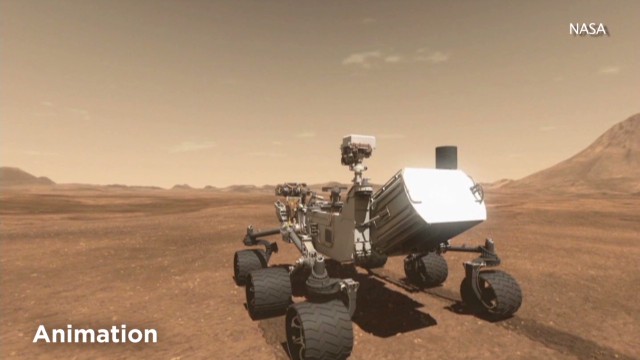
The image shows curiosity robot exploring on mars plant

One of the first photos it sent home showed a self-portrait of its shadow. The dark gray specter of machinery against a lighter grainy backdrop showed up minutes after the news of its arrival, as if to say "I'm here!"
With its cameras as our eyes, it opened our minds to un-roved territory. If you're a NASA engineer, you might even call it "she."
Curiosity, NASA's most sophisticated and complex Mars rover, touched down on the Red Planet on the morning of August 6, 2012 (August 5 if you're in Pacific Daylight Time). The $2.5 billion mission set out to explore Gale Crater, which was thought to have once hosted flowing water, and find out if that environment was once habitable.
Spoiler alert: It was.
But that's not all the rover found while traveling 1.6 kilometers across Mars' barren surface during its 12 months on the planet. Curiosity has collected 190 gigabits of data and sent back more than 36,700 full images and 35,000 thumbnail images, NASA said. The rover has also fired more than 75,000 laser shots to help scientists analyze the composition of material, and collected samples from two rocks.
Photos: Mars rover Curiosity Photos: Mars rover Curiosity
NASA scientists joke that the "warranty" on Curiosity is two years, since that was the rover's design specification, said Ashwin Vasavada, deputy project scientist for the Mars Science Laboratory Mission. But other robotic vehicles have far outlasted their projected lifetimes. NASA landed twin rovers Spirit and Opportunity on Mars in 2004, and Opportunity is still chugging along. (Spirit stopped communicating in 2010).
Now, Curiosity is on its way to Mount Sharp, a three-mile-high structure made of layers that, scientists believe, recorded Mars' geological history.
"It's a lot of work and a lot of people involved, but it's wonderful in the sense that it's really capable scientifically," Vasavada said of the rover. "We're always amazed at how much we can do through this robot."
To mark the anniversary of its first year on Mars, Curiosity played "Happy Birthday" to itself Monday night, using an on-board instrument to beep out the tune. No word on whether anyone was listening.
Here are five fascinating milestones from Curiosity's first 12 months:
1. OMG, it actually landed. #mindblownHow do you land a two-ton, car-sized rover on another planet? Engineers thought about it a lot, and came up with a complex plan requiring a sky crane and the world's largest supersonic parachute. The acrobatic maneuvers required to get it safely to the ground were dubbed the "seven minutes of terror," as featured in a NASA video simulation depicting just how many things had to go right to get the rover on the ground in one piece.


Adam Steltzner, lead engineer overseeing the rover's arrival, told reporters a few days before the big night, "I promise you it is the least crazy of the methods you could use to get a rover the size of Curiosity on Mars."
For the social media generation, this was our moon landing.
The Internet went wild over a rover flight director who showed up for work on landing night with a mohawk, got hailed as "Mohawk Guy,"and later received a shout-out from President Barack Obama. Curiosity itself has a verified Twitter account (with 1.3 million followers), and tweeted that night, "I'm safely on the surface of Mars. GALE CRATER I AM IN YOU!!! #MSL."
"The overall highlight, I think, even a year later, still is planning successfully and seeing Gale Crater for the first time," Vasavada said. He added: "We landed much more smoothly than we ever rehearsed it."
2. Life on Mars could have existedThis was the major science highlight of Curiosity's inaugural Martian year, Vasavada said. Although this discovery builds upon previous ideas, Curiosity provided enough confirmation for scientists to finally come out and say it: The environment Curiosity has been exploring was once habitable.
"We now know Mars offered favorable conditions for microbial life billions of years ago," said the mission's project scientist, John Grotzinger of the California Institute of Technology.
Curiosity became the first robot to drill on another planet, and the powder on the drill bit gave the scientists sufficient evidence to say that life could have survived in that area. The drill material had chemicals important for life in it, including sulfur, nitrogen, hydrogen, oxygen, phosphorus and carbon. Also excitingly for scientists, the sample contained a type of clay that forms in the presence of water.
The rover's Mast Camera (Mastcam) additionally spotted evidence of water-bearing minerals in the Yellowknife Bay area where Curiosity first drilled. Scientists detected minerals using the camera's infrared-imaging capability.
Gallery: Curiosity's best photos of the Red Planet
This area that Curiosity has been exploring is part of an alluvial fan, a formation of debris left by a river that once flowed into the crater, scientists say.
"We investigated the fan and found evidence that there was very likely an intermittent lake that had freshwater at one point," Vasavada said.
3. Mars is red on top, gray belowThat material in the drill bit that the rover used to probe rock wasn't the same orange color that's so familiar to us from the rover's photography. Instead, it was gray, scientists said in February.
"You can probably bet that when things turn orange, it's because there's a rusting process of some kind going on that oxidizes the iron in the rock," Joel Hurowitz, sampling system scientist for Curiosity at NASA's Jet Propulsion Laboratory, said at the time.
4. The planet's atmosphere was destroyed a long time ago .Using instruments on board Curiosity, scientists determined that the Martian atmosphere hasn't changed much in the last 4 billion years, and during that whole time it has been thin, as well as inhospitable to life as we know it.
Initially, however, after the planet formed 4.5 billion years ago, the planet's atmosphere was 100 times denser than the Earth's atmosphere, scientists say. Their results were published in the journal Science in July.
We could learn even more about the atmosphere from NASA's Mars Atmosphere and Volatile Evolution Mission orbiter, which is expected to launch in November. This spacecraft will have techniques to measure the current rate of loss of the atmosphere.
5. Radiation makes the trip to Mars dangerous for humans.Curiosity spent 253 days getting to Mars in 2012. During that time, the mission (officially called Mars Science Laboratory) was collecting data about radiation on the journey to the Red Planet using the Radiation Assessment Detector device.
An analysis of this data, published in the journal Science in May, found that Mars-bound pioneers would be exposed to radiation levels that could effectively retire astronauts under NASA's current standards.
"The radiation environment in deep space is several hundred times what it is on Earth, and that's even inside a shielded spacecraft," said Cary Zeitlin, principal scientist for the Martian Radiation Environment Experiment. Scientists are working on faster engines to shorten the trip to Mars, and may be able to conceive of a spacecraft with better shielding.
501 days in space with your spouse: Could you handle it?
What's next? Drive, drive, drive!
The rover's second year will be mostly about the five-mile drive to Mount Sharp, Vasavada said.
So far, Curiosity has stopped a lot to test out its instruments, collecting and analyzing samples and exploring particular areas. Now, it will drive as far as it can every day -- but not at Earthly highway speeds. Vasavada's hope is to get the rover to Mount Sharp by next summer.
During the drive, the rover will continue snapping photos, and the meteorological instruments will still take measurements. Curiosity will stop if it spots anything -- a structure or formation, or the improbable Martian -- that looks interesting to scientists.
In 2020, another NASA rover is planned to join the small fleet of human-made vehicles on Mars. This one may be able to collect samples for potential return to Earth, and test technology relevant to human exploration.
Meanwhile, the Opportunity rover rolls along, in its 10th year, exploring Mars on the opposite side of the planet from Curiosity.

None of these rovers may ever meet. But perhaps their tracks will mark the paths where humans will someday tread.

Posted on 06:43 by Unknown